上次在为DUX主题4.0以前版本添加首页显示置顶文章功能文章分享了一个转自@蝈蝈要安静的设置方法,那是基于官方4.0以上的版本提取的。其实在2018年农历新年年初,站长也找一个朋友做过DUX主题的修改,也是想实现在DUX主题最新发布前显示顶置文章,并且支持设置只显示指定分类目录顶置文章。但代码也有不完善的地方,有需要的朋友可以试试,具体显示效果如下:
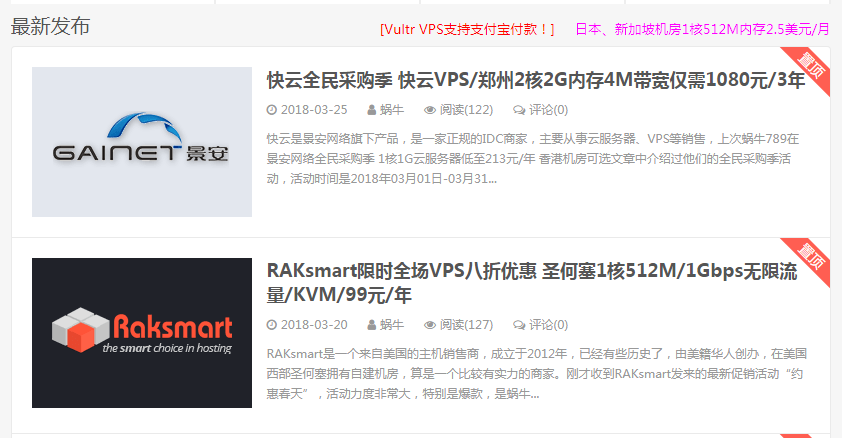
1、修改主题index.php
在主题index.php文件当中的“<?php $args = array(‘ignore_sticky_posts’ => 1,”前面加入下面代码。’cat’ => 后面填写需要显示的顶置分类ID,关于如何查看分类ID可以查看此文章:https://www.zhuji999.com/15938.html#title-2。
<?php
 if ($paged==1) {
 ?>
 <?php
 $args = array(
 'post__in' => get_option('sticky_posts'),
 'cat' => 68,//置顶分类ID
 'ignore_sticky_posts' => 0,
 );
 if( _hui('notinhome') ){
 $pool = array();
 foreach (_hui('notinhome') as $key => $value) {
 if( $value ) $pool[] = $key;
 }
 $args['cat'] = '-'.implode($pool, ',-');
 }

if( _hui('notinhome_post') ){
 $pool = _hui('notinhome_post');
 $args['post__not_in'] = explode("\n", $pool);
 }
 query_posts($args);
 ?>
 <?php get_template_part( 'excerpt-zd' ); ?>
 <?php
 }
 ?>
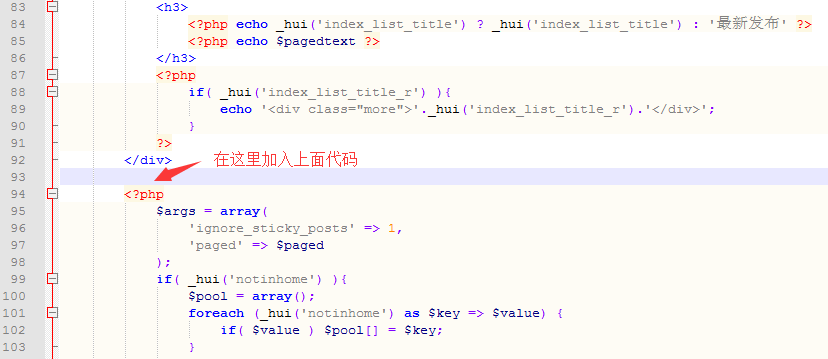 2、新建excerpt-zd.php
新建一个excerpt-zd.php,我们只需要复制一份excerpt.php文件改名为“excerpt-zd”,然后用记事本打开把下面代码替换为原来代码,是全部替换哦。
<?php
/**
 * Used for index/archive/search/author/catgory/tag.
 *
 */
$ii = 0;
while ( have_posts() ) : the_post();
 $_thumb = _get_post_thumbnail();
 $_excerpt_text = '';
 if( _hui('list_type')=='text' || (_hui('list_type') == 'thumb_if_has' && strstr($_thumb, 'data-thumb="default"')) ){
 $_excerpt_text = ' excerpt-text';
 }
 $ii++;
 echo '<article class="excerpt excerpt-'.$ii. $_excerpt_text .' excerpt-zd">';
 if( _hui('list_type') == 'thumb' ){
 echo '<a'._post_target_blank().' class="focus" href="'.get_permalink().'">'.$_thumb.'</a>';
 }else if( _hui('list_type') == 'thumb_if_has' && !strstr($_thumb, 'data-thumb="default"') ){
 echo '<a'._post_target_blank().' class="focus" href="'.get_permalink().'">'.$_thumb.'</a>';
 }
 echo '<header>';
 if( _hui('post_plugin_cat') && !is_category() ) {
 $category = get_the_category();
 if($category[0]){
 echo '<a class="cat" href="'.get_category_link($category[0]->term_id ).'">'.$category[0]->cat_name.'<i></i></a> ';
 }
 };
 echo '<h2><a'._post_target_blank().' href="'.get_permalink().'" title="'.get_the_title().get_the_subtitle(false)._get_delimiter().get_bloginfo('name').'">'.get_the_title().get_the_subtitle().'</a></h2>';

 echo '</header>';
 echo '<p class="meta">';

 if( _hui('post_plugin_date') ){
 echo '<time><i class="fa fa-clock-o"></i>'.get_the_time('Y-m-d').'</time>';
 }
 if( _hui('post_plugin_author') ){
 $author = get_the_author();
 if( _hui('author_link') ){
 $author = '<a href="'.get_author_posts_url( get_the_author_meta( 'ID' ) ).'">'.$author.'</a>';
 }
 echo '<span class="author"><i class="fa fa-user"></i>'.$author.'</span>';
 }
 if( _hui('post_plugin_view') ){
 echo '<span class="pv"><i class="fa fa-eye"></i>'._get_post_views().'</span>';
 }
 if ( comments_open() && _hui('post_plugin_comm') ) {
 echo '<a class="pc" href="'.get_comments_link().'"><i class="fa fa-comments-o"></i>评论('.get_comments_number('0', '1', '%').')</a>';
 }
 echo '</p>';
 echo '<p class="note">'._get_excerpt().'</p>';
 if( _hui('post_link_excerpt_s') ) _moloader('mo_post_link');
 echo '<span class="zd">置顶</span>';
 echo '</article>';
endwhile;
3、修改main.css
把下面代码加到main.css文件的最后面。
/** 修正摘要列表定位方式 */
.excerpt {
    position: relative;
}
/** 置顶图标文字版样式 **/
.excerpt .zd  {
    position: absolute;
    padding: 0;
    right: -38px;
    top: -16px;
    display: block;
    width: 76px;
    height: 20px;
    line-height: 20px;
    background: #ff5e52;
    color: #fff;
    font-size: 14px;
    font-weight: 400;
    text-align: center;
    transform: rotate(45deg);
    transform-origin: 0% 0%;
}
@media (max-width:640px){
    .excerpt-sticky header{text-indent:0px;position: unset;}
    .sticky-icon {
        position: absolute;
        padding: 0;
        right: -38px;
        left: auto;
        top: -16px;
        display: block;
        width: 76px;
        height: 20px;
        line-height: 20px;
        background: #ff5e52;
        color: #fff;
        font-size: 14px;
        font-weight: 400;
        text-align: center;
        transform: rotate(45deg);
        transform-origin: 0% 0%;
    }
}
DUX无限制版下载方法
主机玖玖博客DUX无限制版本下载方案,使用微信扫描下面二维码关注主机玖玖微信公众号。注意是关注微信公众号, 微信公众号每天晚上推送当日热门促销活动。然后在微信公众号回复“DUX主题”即可获取下载链接。100%服务器下载版本,绿色无毒。